

Small business website traffic is one of the most underused assets you already have — every click, scroll, and page load tells you how well you’re doing. Think of your website as the 24/7, 100%‑open shop front that’s open to the world. For SMB owners, the challenge isn’t building a site; it’s knowing which numbers to watch so you can act on them.
For small business website traffic, the five metrics below are all you need to start:
| Metric | What It Tells You | Why It Matters |
|---|---|---|
| Visitors | How many people land on your site | Size of your audience |
| Bounce Rate | % who leave after one page | Indicates relevance or usability issues |
| Average Session Duration | How long people stay | Engagement level |
| Pages Per Session | How many pages users visit | Navigation flow & content depth |
| Conversion Rate | % who take a desired action (e.g., sign up, buy) | Your revenue engine |
Quick Check: In Google Analytics, these metrics live under Acquisition → Overview.
| Tool | What It Gives | How to Start |
|---|---|---|
| Google Analytics | Full traffic & behavior report | Sign up with a free account, paste the tracking code into your site |
| Google Search Console | Search visibility, click‑through data | Verify your site, view “Performance” report |
| Hotjar (Free Tier) | Heatmaps & session recordings | Install the script, view “Heatmaps” → “Click” |
| Moz (Free) or Ubersuggest | Basic SEO score & keyword ideas | Enter your domain, review “SEO Overview” |
Pro tip: If you run a Shopify store, most of these are built‑in or easy to add via an app.

Heatmaps show hot zones (red) and cold zones (blue) on a page.
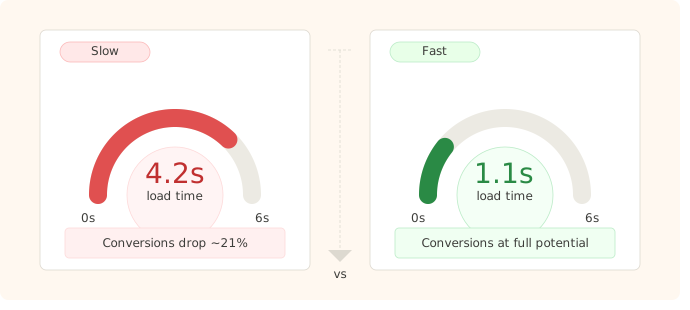
Speed (load time) is a ranking factor and a UX factor.
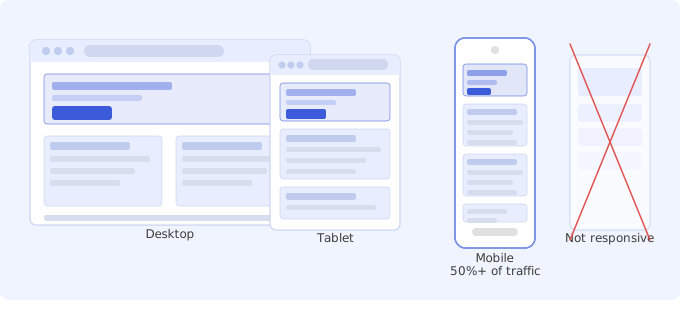
Over 50 % of web traffic comes from mobile.
Users should find what they want in ≤3 clicks.
Understanding your numbers is just as important as your traffic — see our guide to small business accounting basics to make sure you know what to do with the visitors you attract.
This quick-start checklist will get your small business website traffic data flowing in under an hour.
| Step | Tool | What to Do |
|---|---|---|
| 1 | Google Analytics | Install code, verify traffic source |
| 2 | Hotjar | Set up a heatmap for your home page |
| 3 | PageSpeed Insights | Fix the top 3 speed issues |
| 4 | Google Search Console | Check the Mobile Usability report |
| 5 | Ubersuggest | Pick one keyword and add to a page title |
Save time: Put these tasks into a one‑week sprint. At the end, you’ll have a working dashboard of insights and a couple of tweaks that could boost traffic or conversions.